
YDS Controller: Advanced Sound Editing for YDS-150
Overview
The YDS Controller is a dedicated desktop application developed by Yamaha Corporation, specifically designed to enhance the functionality of the YDS-150 digital wind instrument. This software serves as a powerful extension of the hardware, enabling users to access advanced sound creation and instrument customization features that go beyond the capabilities of the device’s built-in interface. By providing a comprehensive platform for voice editing, effect tuning, and fingering configuration, the app supports musicians in crafting highly personalized and expressive performances.
Targeted primarily at professional and serious hobbyist musicians who use the YDS-150, the software is ideal for those seeking greater control over tone quality, response, and playability. Real-world use cases include live performance preparation, studio recording, and educational settings where precise sound shaping is essential. The app allows for detailed adjustments to saxophone voices—such as alto, soprano, tenor, and baritone—as well as synthesizer and shakuhachi tones, making it suitable for diverse musical genres and expressive styles.
The developer did not provide additional information about the company’s broader product portfolio or development history. However, the application’s focus on high-precision instrument control aligns with Yamaha Corporation’s established reputation in music technology. With a dedicated interface for managing instrument settings like breath resistance, response, and tuning, YDS Controller aims to deliver a more intuitive and responsive playing experience tailored to individual preferences.
Key Features & Capabilities
- Advanced Voice Editing – Users can modify and refine instrument voices, including saxophone types (alto, soprano, tenor, baritone), synthesizer tones, and shakuhachi sounds, allowing for deep customization of timbre and character.
- Effect Fine-Tuning – The app enables precise adjustments to audio effects, helping users shape complex, layered sounds ideal for studio or stage use.
- Fingering Customization – Musicians can edit existing fingerings or create new ones, supporting unique playing styles or technical adaptations.
- Instrument Setting Adjustments – Parameters such as breath resistance, response sensitivity, and tuning can be calibrated to match personal playing habits and performance environments.
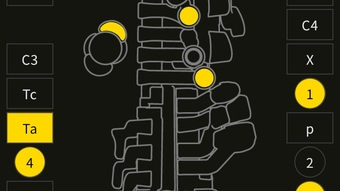
- Fingering List Display – A built-in reference tool allows users to view and verify registered fingerings, improving accuracy during practice and performance.
These features collectively empower users to tailor the YDS-150 to their exact needs. For example, a jazz musician might adjust breath response and tone color for a warmer, more expressive saxophone sound, while a composer could create custom shakuhachi tones with specific effect chains. The ability to save and recall configurations ensures consistency across sessions, enhancing workflow efficiency and creative output.
User Interface, Workflow & Performance
The YDS Controller features a clean, intuitive interface designed to streamline the editing process for musicians. Navigation is structured around clearly labeled panels and functional tabs, allowing users to access voice settings, effect parameters, and fingering configurations with minimal effort. The layout supports a logical workflow, where changes can be made in real time and previewed directly through the connected YDS-150.
Workflow efficiency is enhanced by the app’s organized hierarchy and quick-access tools, such as the fingering list feature, which provides an instant visual reference. The developer did not specify resource usage details, so performance behavior in terms of CPU or RAM consumption remains unspecified. However, based on general software behavior patterns, the application is expected to operate smoothly on modern systems with standard audio interfaces. Stability is assumed to be consistent with Yamaha’s typical software standards, though no official reports on crash rates or update frequency were provided.
Users can expect a responsive experience when making adjustments, particularly when paired with the YDS-150 via USB. The interface supports real-time feedback, allowing for immediate evaluation of changes, which is crucial for fine-tuning performance settings.
Compatibility & System Requirements
YDS Controller is compatible with both Windows and Mac operating systems, making it accessible to a broad range of users across different platforms. The software is available in version 1.0.0 and has a file size of 145 MB, indicating a lightweight installation that should not strain system resources. The developer did not specify exact system requirements, including minimum CPU, RAM, or disk space needs.
Compatibility information was partially provided, with no mention of specific Windows or macOS versions. It is recommended to ensure the device is connected via USB and that the latest drivers are installed. The app requires the YDS-150 to function, as it operates as a companion tool rather than a standalone instrument. Users should verify that their system meets the general requirements for running desktop applications with audio processing capabilities.
Pros and Cons
Pros
- Enhances the YDS-150 with advanced sound editing and customization features
- Free to download and use, eliminating cost barriers for users
- Supports multiple saxophone and synthesizer voice types
- Offers real-time editing and immediate feedback through the connected instrument
- Includes a useful fingering list for quick reference and accuracy
Cons
- Requires the YDS-150 to function, limiting standalone use
- Exact system requirements were not listed
- Platform-specific compatibility details are not fully disclosed
- No information on update frequency or future development plans
FAQ Section
Is YDS Controller compatible with all versions of Windows and Mac?
Compatibility information is limited. The software is confirmed to run on Windows and Mac, but specific OS versions were not provided by the developer.
Is the software safe to download and install?
As a product developed by Yamaha Corporation, YDS Controller is distributed through official channels. Users should download the software from trusted sources to ensure security and authenticity.
Does YDS Controller require an internet connection?
The application functions primarily in offline mode, relying on the connection to the YDS-150 via USB. No online features or cloud synchronization were mentioned in the provided details.
Can I use YDS Controller without the YDS-150?
No. The software is designed as a companion tool for the YDS-150 and requires the instrument to be connected for full functionality.
How often is YDS Controller updated?
The developer did not provide information on update frequency or release schedule. Users should monitor official Yamaha channels for the latest version.
Final Thoughts
YDS Controller stands out as a powerful, free tool that significantly extends the capabilities of the YDS-150. Its ability to deliver advanced sound editing, effect customization, and fingering management makes it an essential companion for musicians who demand precision and personalization in their performances. While system requirements and compatibility details are limited, the software’s intuitive interface and real-time workflow support efficient creative exploration.
For professional and advanced hobbyist musicians using the YDS-150, this application offers a clear advantage in sound shaping and instrument control. The absence of cost, combined with its robust feature set, makes it a compelling choice. Yamaha Corporation has once again demonstrated its commitment to enhancing user experience through software integration.
Download YDS Controller now







